
Screen size sounds like the simplest spec on an Android head unit listing. That is, right up until a bulk order arrives and half the units don’t sit flush in the dashboards they were meant for. Getting this right matters more than most buyers expect. The “inches” printed on a listing don’t always mean what they seem to. For a complete technical overview of what an Android head unit is and how it is built, see our guide on Android head units
This guide covers what screen size actually measures. It also compares 9-inch and 10.1-inch units. You will learn how screen size interacts with vehicle fitment and display specs. Finally, we highlight the sourcing traps worth watching for before a container ships.
What Defines Android Head Unit Display Size? Core Definition & Industry Standards
Screen size is measured diagonally across the visible display area only. This means corner to corner of the active screen, not the plastic bezel or frame surrounding it. That distinction matters more than it sounds like it should.
Two units can both claim “10-inch” and still differ in actual dimensions. This happens because some suppliers measure the full front panel including the bezel, rather than just the display glass. The visible display area is what actually shows content. The frame is just housing. A listing photo won’t tell you which measurement was used. It is worth asking directly or checking a spec sheet that separates the two.
Automotive display panels generally follow the same diagonal measurement convention used across consumer electronics. However, enforcement varies by supplier. Below roughly 7 inches, screens start to feel cramped for real navigation use. Readability and touch accuracy both suffer at that size. Most current B2B demand sits at 9 inches and above for exactly this reason.
9-Inch vs 10.1-Inch Android Head Unit: Full Size Comparison
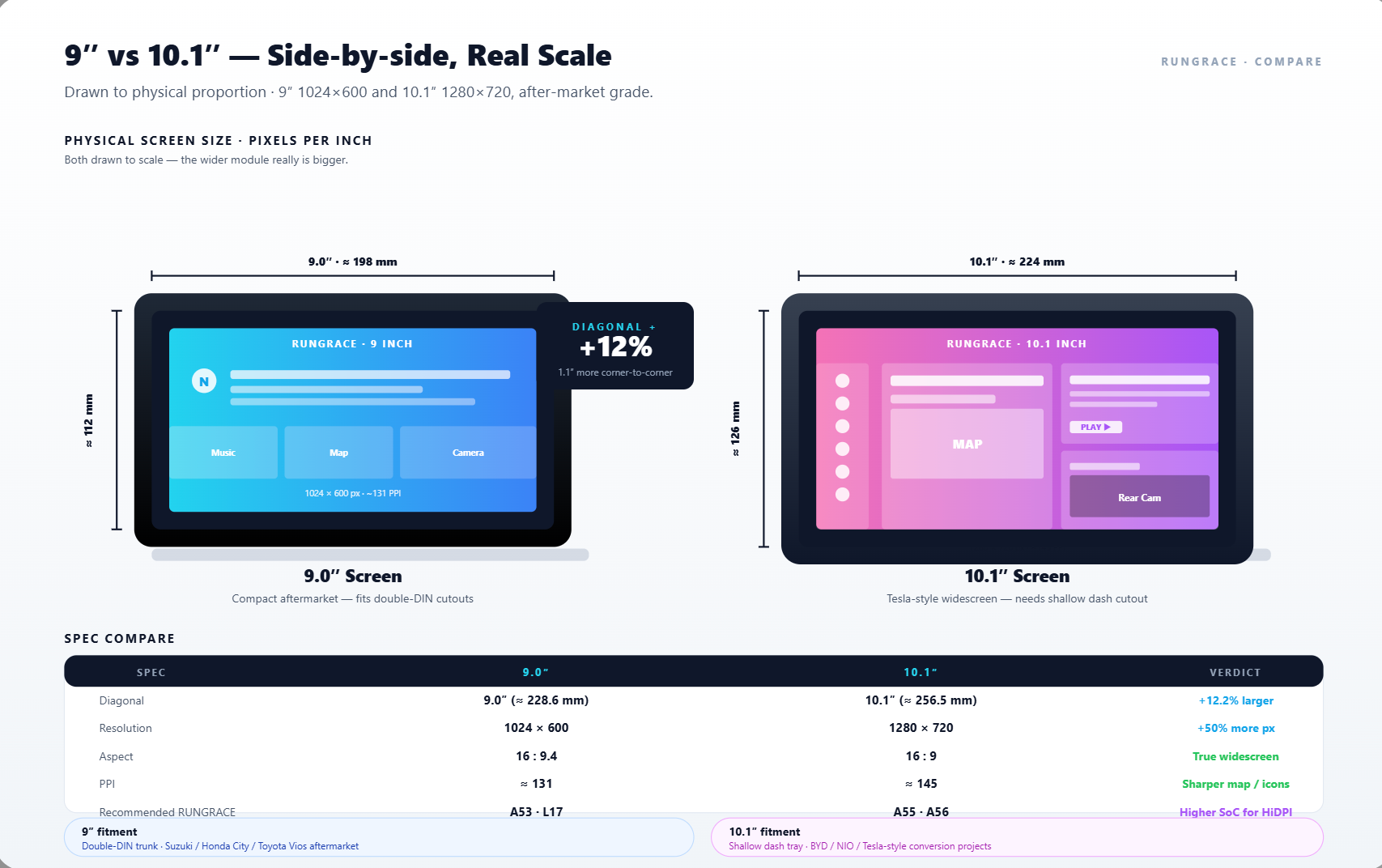
These two sizes dominate current wholesale demand. The differences between them go well beyond the half-inch on paper.
Feature Comparison Table
| Feature | 9-Inch | 10.1-Inch |
|---|---|---|
| Diagonal size | 9 inches | 10.1 inches |
| Physical footprint | More compact | Noticeably larger |
| Readability | Good | Better, especially at a glance |
| Touch target size | Adequate | More comfortable, fewer mis-taps |
| Typical resolution | 1024×600 or 1280×720 | 1024×600, 1280×720, or 1920×1080 |
| PPI at 1024×600 | ~136 PPI | ~124 PPI |
| Price position | Entry to mid-range | Mid to premium |
| Best for | Cost-sensitive, compact dashboards | Premium positioning, larger dashboards |
One thing worth flagging early: the same resolution stretched across a larger screen produces lower pixel density. This affects how sharp the image actually looks. The next section covers this in more depth.
Screen Size & Vehicle Compatibility: Key Adaptation Rules
This is where a lot of otherwise-solid orders go sideways. It is worth getting the logic straight before placing one.
Screen size and the Double DIN mounting standard are related but not the same thing. Double DIN describes the physical chassis opening in a dashboard. It is a fixed mounting standard. Screen size describes the display itself. In practice, 9-inch and 10.1-inch units frequently share the same underlying chassis and mounting dimensions. The larger screen simply extends beyond the DIN opening rather than requiring an entirely different fitment.
That is also where the distinction between floating screen and in-dash installation matters. Floating screens sit proud of the dashboard on a stand. They are generally more flexible across different vehicle shapes since they don’t need to match the opening precisely. In-dash installation requires the screen to sit flush within the vehicle’s original opening. This is far more sensitive to exact size and vehicle-specific trim.
Key Fitment Checks Before Ordering
A few things are worth checking before ordering:
- Dashboard curvature and depth clearance for the specific vehicle model.
- Whether the unit needs a vehicle-specific mounting bracket or trim kit.
- CAN Bus adapter compatibility for that vehicle’s steering wheel controls and other data.
- Confirmation of exact fitment for your specific vehicle model, not just a general size claim.
Screen size selection is genuinely secondary to vehicle-specific fitment. A unit at the “right” size that isn’t properly matched to the vehicle’s mounting and CAN Bus requirements can still fail to install cleanly. This holds true regardless of what the display measures.
Screen Size & Display Specifications: How They Impact Visual Performance
Bigger isn’t automatically better. This is where that misconception causes the most sourcing regret.
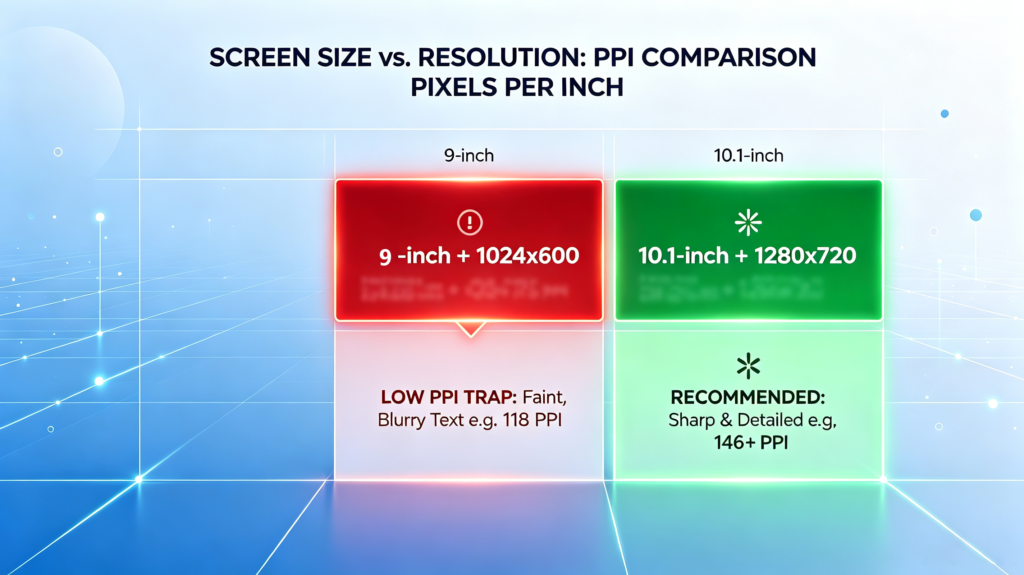
Screen size and resolution together determine PPI — pixels per inch, or pixel density. This is what actually governs how sharp an image looks. It does so more so than either spec on its own. The same resolution spread across a larger screen produces lower PPI, since the same pixel count is stretched over more physical area.
Resolution and PPI Comparison
| Resolution | 9-Inch PPI | 10.1-Inch PPI |
|---|---|---|
| 1024×600 | ~136 PPI | ~124 PPI |
| 1280×720 | ~170 PPI | ~155 PPI |
| 1920×1080 | ~256 PPI | ~233 PPI |
At 1024×600, both sizes are usable but not sharp — adequate for basic navigation, noticeably softer for detailed text or fine map labels. Stepping up to 1280×720 is a meaningful jump in clarity on either screen, and 1920×1080 delivers genuinely crisp results, particularly worth prioritizing on the larger 10.1-inch panel where lower resolutions show their limits more visibly.
Panel type interacts with all of this too. IPS panels deliver reliable viewing angles and accurate color at a moderate cost. QLED panels add brightness and color depth. These improvements matter more as screen size grows and outdoor visibility becomes a bigger factor. The trap to watch for: a large screen paired with low resolution produces visible pixelation. Screen resolution and visual rendering also depend on processor capability — for a detailed breakdown of processor platforms and how they affect display performance, read our guide on Android head unit processors.
How to Choose the Right Screen Size for Your B2B Business
The right size depends on who you’re selling to and what their dashboards actually look like. There is not a single universal answer. For a complete framework on matching head unit specs to your business scenario — including 4S dealerships, cross-border wholesale, fleet operators, and OEM projects — read our guide: How to Choose an Android Head Unit for Your Vehicle.
Recommendations by Business Type
- 4S dealerships running premium upgrades tend to do better with 10.1-inch units paired with higher resolution. The larger, sharper display supports the kind of upgrade pricing that makes the swap worthwhile for both the dealer and the customer.
- Standard dealership upgrades can lean on 9-inch as a solid, cost-effective baseline. It still satisfies most customer expectations without pushing the price up unnecessarily.
Recommendations by Market Segment
- Cross-border wholesale into cost-sensitive markets generally favors 9-inch with 1280×720 resolution as the balanced middle ground. It is sharp enough to avoid complaints. It is affordable enough to move in volume.
- Mature markets increasingly expect 10.1-inch as the standard. 1920×1080 resolution is becoming the norm rather than the exception as buyer expectations rise.
OEM/ODM projects need to match the vehicle segment specifically. They should not default to one size across a product line. Manufacturers with dedicated R&D capability — engineering teams spanning software, hardware circuit design, PCB layout, UI, CAN Bus protocol, and OTA development — can customize screen size, resolution, RAM/ROM, and interface configuration. For a detailed breakdown of RAM and ROM specifications and how they work alongside the display, read our guide on RAM and storage for Android car stereos.
Common Screen Size-Related Sourcing Risks & Red Flags
A handful of patterns account for most of the screen-size complaints that surface after a bulk order ships.
- Fake size labeling tops the list. Some products claim a size based on the outer frame rather than the actual display diagonal. Always verify the visible display measurement directly. Do not trust the number on a listing alone.
- Poor resolution on large screens is a close second. A 10.1-inch unit running 1024×600 will draw pixelation complaints from end users almost immediately. This happens even though the “screen size” claim itself was technically accurate.
- Compatibility misrepresentation causes real damage too. Some suppliers claim universal fit but ship units that protrude excessively or physically block dashboard controls once installed.
- Physical frame quality matters as well, particularly on floating screen designs. A weak mounting bracket leads to vibration and rattling noise that undermines the whole product.
- Heat management deserves real attention on larger screens specifically. More display area generates more heat. Inadequate dissipation leads to failure in hot climates or direct sun exposure.
Reliable manufacturers address this with documented testing. A 48-hour continuous aging test and high-temperature durability testing around 60°C are reasonable benchmarks to ask any supplier about before committing to volume. Pre-shipment sampling that verifies actual dimensions, appearance, and labeling is also essential to ensure they match what was ordered.
FAQ
Which screen size is the safest bet for cross-border bulk orders?
9-inch is generally the safest universal choice for cross-border bulk orders. It fits the widest range of vehicle dashboards without excessive protrusion. It also keeps unit cost manageable across price-sensitive markets. 10.1-inch works well too, but its larger footprint means checking dashboard clearance more carefully per vehicle model. This makes it less of a true one-size-fits-most option.
Do 9-inch and 10.1-inch units fit the same mounting chassis?
Often, yes. Many 9-inch and 10.1-inch units share the same underlying mounting chassis. The larger screen extends slightly beyond the original opening rather than requiring a different fitment. That said, this depends on the specific vehicle’s dashboard clearance and trim design. It is worth confirming compatibility for your exact model before ordering, rather than assuming it fits.
What is the typical cost difference between 9-inch and 10.1-inch units?
The exact premium varies by supplier and resolution pairing. 10.1-inch units generally run higher than 9-inch due to the larger panel and often higher-resolution options paired with it. For buyers evaluating margin, that premium is usually recoverable through higher retail pricing on premium product lines. The larger display is a visible upgrade customers notice immediately.
What is the minimum resolution to avoid pixelation on a 10.1-inch screen?
Around 155 PPI, corresponding to 1280×720 resolution on a 10.1-inch panel, is a reasonable minimum for genuinely clear text and map detail. The lower 1024×600 option (~124 PPI) is usable but noticeably softer, especially for fine navigation labels. Buyers prioritizing display clarity should treat 1280×720 as the practical floor rather than the ceiling.
Conclusion
Screen size looks like a simple spec until it isn’t. The actual decision touches vehicle fitment, resolution, panel technology, and target market all at once. Verifying real display measurements is essential. Matching size to vehicle-specific mounting requirements is equally important. Pairing screen size with adequate resolution is what separates a bulk order that installs cleanly from one that generates a stack of after-sales complaints.
Sourcing Android head units in the right screen size for your market? Contact our team to discuss size and resolution options, or explore our current Android head unit product lineup.


