
Selecting the right screen size for Android head units is one of the most critical decisions B2B buyers face when placing bulk orders. The choice impacts not only visual appeal and user experience but also installation compatibility, cost structure, and ultimately, end-customer satisfaction. Car dealers, wholesalers, importers, and 4S dealerships need a clear framework to evaluate screen size options against their specific business models. This guide provides that framework—covering industry measurement standards, 9-inch versus 10.1-inch comparisons, vehicle compatibility rules, and the sourcing pitfalls that can turn a bulk order into an after-sales headache.
For a complete technical overview of what an Android head unit is and how it is built, see our guide on Android head units.
What Defines Android Head Unit Display Size? Core Definition & Industry Standards
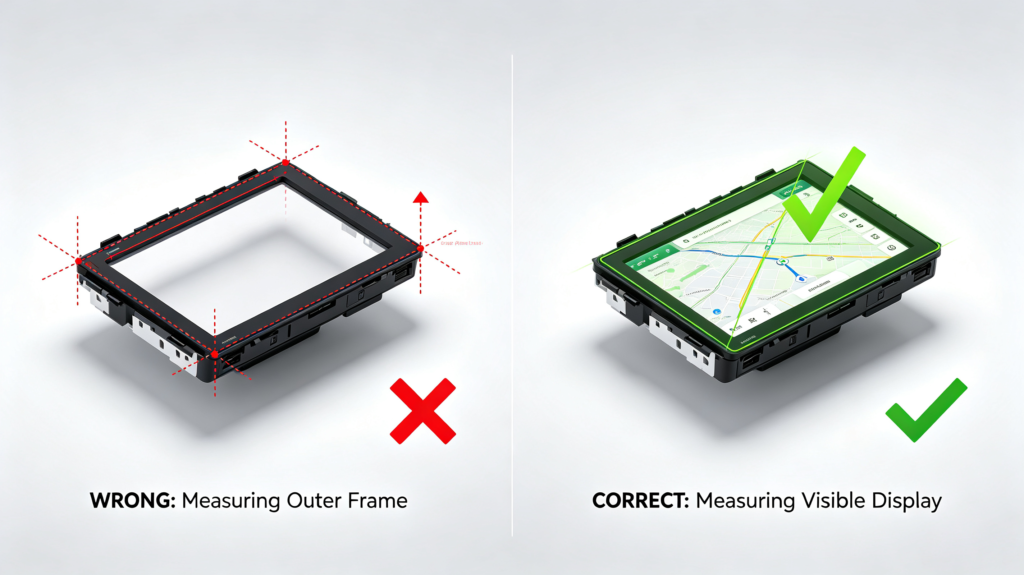
When a supplier quotes a “9-inch” or “10.1-inch” Android head unit screen size, what exactly does that number represent? In the automotive electronics industry, screen size is defined as the diagonal measurement of the visible display area only—the glass panel that actually shows content, not the plastic frame or bezel surrounding it.
This distinction is crucial because some manufacturers advertise screen size based on the outer frame dimensions, creating a significant gap between claimed and actual usable display area. For example, a product marketed as “10-inch” might have a visible diagonal of only 9.2 inches if measured incorrectly. For B2B buyers evaluating Android head unit display specifications, always request the actual visible display area measurement in millimeters—not just the diagonal inch claim.
Google’s Compatibility Definition Document (CDD) for Android Automotive requires that automotive screens have a physical diagonal length equal to or greater than 6 inches to ensure minimum touch target sizes for safe driving interaction. While this establishes a baseline, most aftermarket Android head units in the B2B market fall into the 7-inch to 12.3-inch range, with 9-inch and 10.1-inch being the dominant form factors for bulk orders.
9-Inch vs 10.1-Inch Android Head Unit: Full Size Comparison
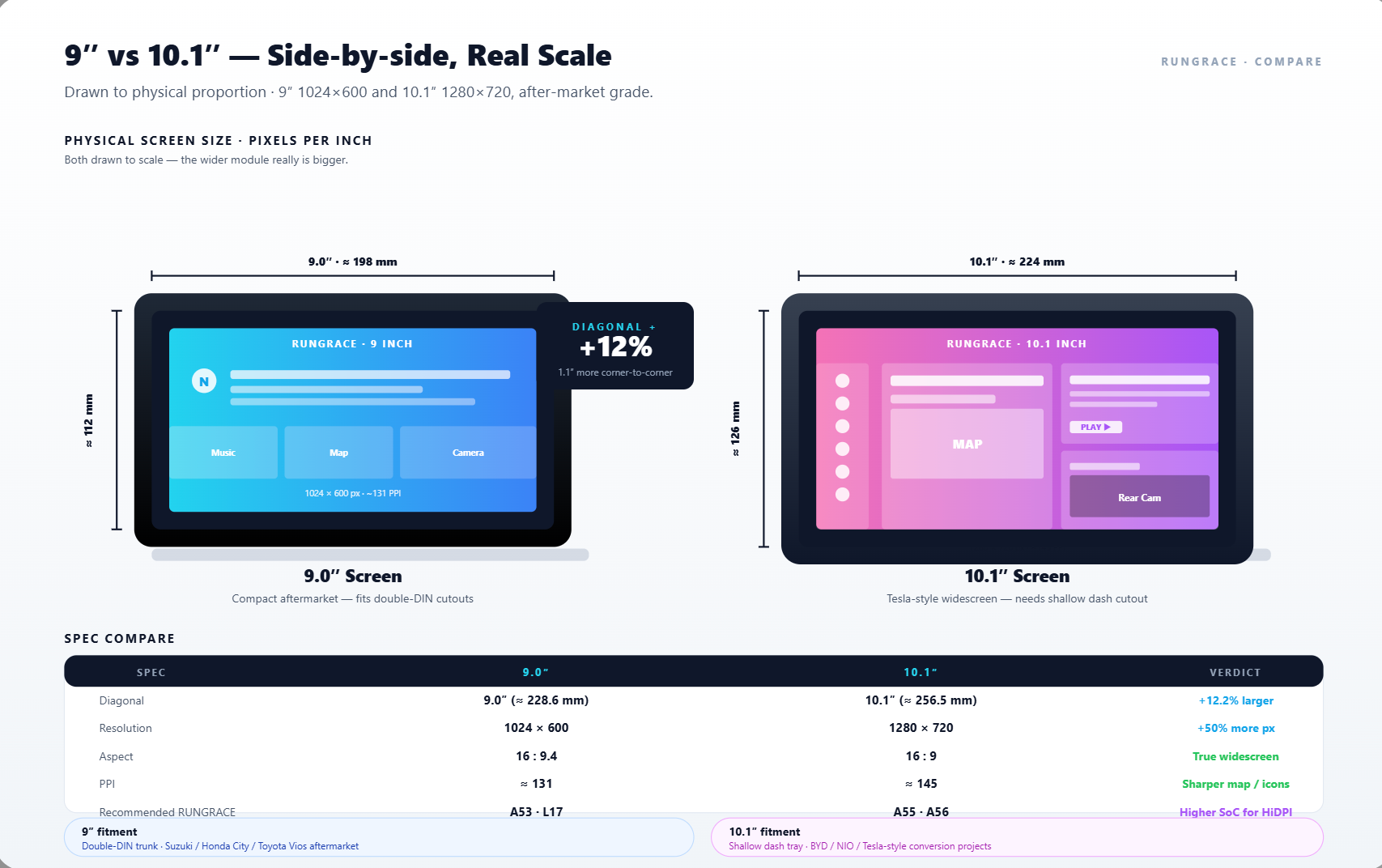
The choice between 9-inch and 10.1-inch screens is the most common decision point for B2B buyers. Each size serves distinct market positions and installation scenarios. Here’s how they compare across critical dimensions:
| Feature | 9-Inch Android Head Unit | 10.1-Inch Android Head Unit |
|---|---|---|
| Diagonal Size | 9.0 inches (visible area) | 10.1 inches (visible area) |
| Physical Footprint | More compact; lower protrusion risk | Wider; moderate dash extension |
| Readability | Clear and functional | More spacious; better at-a-glance |
| Touch Target Size | Adequate for basic tasks | Larger targets; easier while driving |
| Typical Resolution | 1024×600 or 1280×720 | 1024×600, 1280×720, or 1920×1080 |
| PPI at 1024×600 | ~136 PPI | ~124 PPI |
| Price Position | Lower cost; better cost-performance | Premium price point |
| Best For | Cost-sensitive markets, compact dashboards, fleet | Premium channels, mature markets, larger vehicles |
Visual Experience: A 10.1-inch screen offers approximately 13% more viewing area than a 9-inch screen at the same aspect ratio. This translates to better split-screen capability—navigation alongside music controls or rear-camera views. For end users, the larger screen feels more premium and modern, which supports higher retail pricing. However, the 9-inch screen remains highly functional and more than adequate for core navigation and media tasks.
Commercial Value: The price gap between 9-inch and 10.1-inch units varies by supplier and specification, but typically ranges from 15% to 30% higher for the larger display. For 4S dealerships targeting premium buyers, the 10.1-inch justifies the markup. For cross-border wholesalers serving price-sensitive emerging markets, the 9-inch offers better margins and wider acceptability.
Screen Size & Vehicle Compatibility: Key Adaptation Rules
One of the most persistent misconceptions in Android head unit sourcing is that screen size dictates vehicle compatibility. In reality, screen size does NOT equal DIN slot size. A 9-inch and a 10.1-inch head unit often share the same rear chassis and mounting structure—what changes is the display panel attached to the front.
For example, ATOTO’s EdgeFit series offers 9-inch, 10.1-inch, and even 12.5-inch variants that all use the same double-DIN rear chassis and wiring logic. The physical footprint behind the dashboard remains identical; the screen protrudes or extends outward differently based on the panel size.
Key adaptation rules for B2B buyers:
- Double-DIN Standard: Most aftermarket Android head units require a true double-DIN cavity (approximately 180mm x 100mm) behind the dashboard. Screen size does not change this requirement—the rear chassis fits the DIN opening, while the screen sits in front of the dashboard. Some suppliers claim universal fit but ship products that protrude excessively or block dashboard controls, vents, or hazard buttons.
- Floating Screen vs In-Dash: “Floating screen” designs mount the display above or in front of the dashboard, allowing larger screens without modifying the DIN slot. These units use a single-DIN or double-DIN chassis with an adjustable arm or fixed bracket. In-dash designs sit flush within the dashboard opening, limiting screen size to what the dash bezel can accommodate. Floating screens are increasingly popular for 10.1-inch and larger sizes.
- CANBUS Integration: For vehicle-specific features like steering wheel controls and air conditioning data display, proper CANBUS decoder matching matters more than screen size. Vehicles with advanced factory systems require specific protocol adaptation to retain full functionality.
Installation Checklist for Buyers:
- Confirm the vehicle has a true double-DIN cavity or supports floating-screen installation
- Measure dashboard depth—some vehicles lack clearance for larger chassis
- Check protrusion clearance: 9-inch screens typically extend 5–11mm per side beyond the DIN cut-out; 10.1-inch screens extend 12–18mm per side
- Verify mounting bracket compatibility—different vehicle models require specific brackets regardless of screen size
Screen Size & Display Specifications: How They Impact Visual Performance
“Larger is better” is a dangerous oversimplification in Android head unit sourcing. The relationship between screen size, resolution, and panel type determines the actual visual experience—and a poorly specified large screen can look worse than a well-specified smaller one.
The critical metric is pixel density (PPI) —the number of pixels per inch of display area. PPI = resolution diagonal in pixels ÷ screen diagonal in inches. A larger screen with the same resolution has lower pixel density, resulting in less sharp text and images.
Screen resolution works alongside processor capability to determine overall visual performance — for a detailed breakdown of processor platforms and how they affect display rendering, read our guide on Android head unit processors.
Common resolution and PPI benchmarks for 9-inch and 10.1-inch screens:
| Screen Size | Resolution | PPI | Visual Quality |
|---|---|---|---|
| 9-inch | 1024×600 | ~136 PPI | Adequate; functional but not sharp |
| 9-inch | 1280×720 | ~170 PPI | Good; noticeably clearer |
| 9-inch | 1920×1080 | ~256 PPI | Sharp; premium visual quality |
| 10.1-inch | 1024×600 | ~124 PPI | Minimal acceptable; potential pixelation |
| 10.1-inch | 1280×720 | ~155 PPI | Good; recommended baseline |
| 10.1-inch | 1920×1080 | ~233 PPI | Sharp; premium standard |
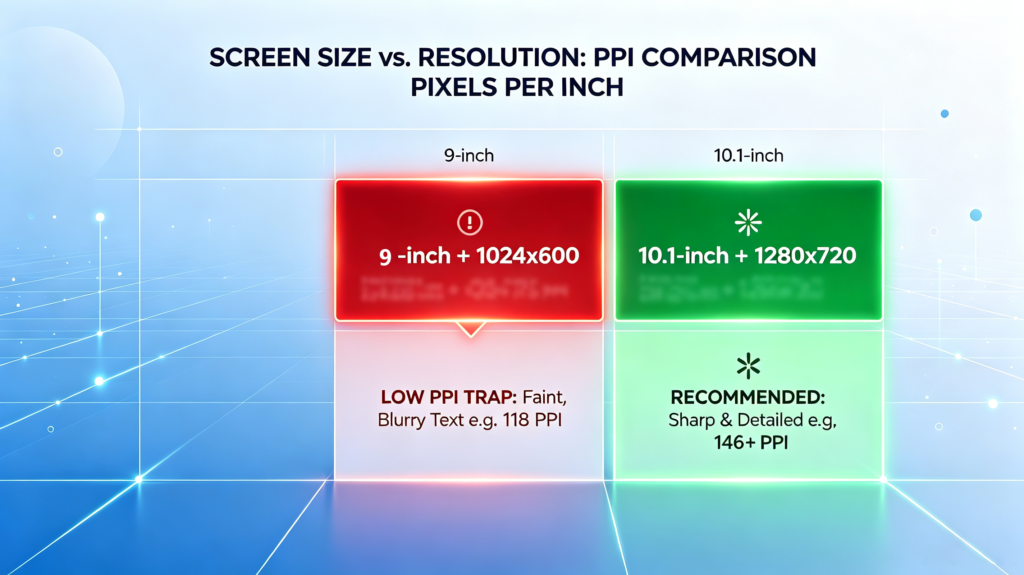
The Sourcing Trap: A 10.1-inch screen with 1024×600 resolution (common in entry-level units) delivers only ~124 PPI—noticeably less sharp than a 9-inch screen at the same resolution (~136 PPI). End users may complain about blurry text or pixelated graphics, especially when displaying navigation maps or video. For B2B buyers, always verify that a 10.1-inch unit ships with at least 1280×720 resolution to maintain acceptable clarity.
Panel Type Considerations: IPS (In-Plane Switching) panels offer superior viewing angles and color accuracy compared to standard TFT or QLED displays. For larger screens, IPS becomes more important because drivers view the screen from off-center angles. A 10.1-inch TFT screen may look washed out when viewed from the passenger seat, whereas an IPS panel maintains image quality across a wider viewing arc.
How to Choose the Right Screen Size for Your B2B Business
Screen size selection should align with your target market, price positioning, and installation requirements. Here’s how different B2B business models typically prioritize screen size:
4S Dealerships & Premium Retail Channels: 10.1-inch recommended. The larger display creates a stronger “wow factor” during test drives and showroom presentations. Premium buyers expect modern, large-screen infotainment—and they’re willing to pay for it. This is the right segment to upsell higher-spec units with 1280×720 or 1920×1080 resolution.
Cross-border Wholesale / Importers: 9-inch offers better cost-performance for high-volume orders. Lower per-unit cost translates to better margins or more competitive pricing. Wide vehicle compatibility reduces fitment issues and returns. For wholesalers shipping to multiple countries with varying vehicle models, the 9-inch screen’s broader compatibility is a practical advantage.
Emerging Markets (Southeast Asia, Middle East, Latin America): 9-inch priority. Price sensitivity dominates purchasing decisions in these markets. The 9-inch screen delivers an adequate visual experience at a competitive cost point. End users upgrading from factory radios or smaller screens are generally satisfied with the improvement.
Mature Markets (Europe, US): 10.1-inch preferred. Consumers in these markets expect larger displays as standard—influenced by Tesla and modern OEM infotainment trends. The higher price point is accepted when the product delivers a premium experience. Many buyers in mature markets also prefer higher-resolution 10.1-inch units (1280×720 minimum).
OEM / ODM Custom Projects: Screen size is determined by vehicle design specifications and customer requirements—not by standard sizing conventions. Buyers can specify exact resolution, RAM/ROM configurations, and interface expansions based on target vehicle models and user profiles.
For a detailed breakdown of RAM and ROM specifications and how they work alongside the display, read our guide on RAM and storage for Android car stereos.
Fleet & Commercial Vehicles: 9-inch ideal. Fleet operators prioritize durability, cost-efficiency, and reliable GPS visibility over screen real estate. The 9-inch screen reduces unit cost while providing adequate functionality for commercial navigation and media use.
For a complete framework on matching head unit specs to your business scenario — including 4S dealerships, cross-border wholesale, fleet operators, and OEM projects — read our guide: How to Choose an Android Head Unit for Your Vehicle.
Common Screen Size-Related Sourcing Risks & Red Flags
When sourcing Android head units in bulk, screen size-related quality issues are among the top causes of after-sales losses. Here are the most common red flags and how to avoid them:
Fake Size Labeling: Some suppliers advertise screen size based on the outer frame or bezel, not the actual visible display diagonal. Always verify the active display area measurement in the product specification sheet. A unit claiming “10-inch” with a visible area of only 9.2 inches is a warning sign of broader quality compromises.
Poor Resolution on Large Screens: A 10.1-inch screen with 1024×600 resolution may look acceptable in sample photos but disappoint end users who expect sharp, clear visuals. Pixelation complaints are common with this combination. Confirm the resolution for each screen size variant before placing bulk orders.
Compatibility Misrepresentation: Some suppliers claim “universal fit” but ship products that protrude excessively, block dashboard controls, or fail to mount securely. Vehicle-specific fitment depends on mounting brackets, CANBUS decoders, and dash depth—not just screen size. Always test samples on actual vehicle models.
Weak Mounting on Floating Screens: Large floating screens with poor mounting brackets can vibrate during driving, causing noise, touchscreen misregistration, or eventual failure. Quality suppliers conduct vibration testing to validate bracket strength. Look for suppliers who perform road-simulation vibration tests as part of their quality control.
Heat Management Failures: Larger screens generate more heat, especially in direct sunlight. Inadequate heat dissipation leads to black screens, system freezes, or permanent panel damage in high-temperature environments (common in Middle Eastern and Southeast Asian markets). Reputable manufacturers perform high-temperature aging tests—typically 48 to 72 hours at 60°C—to verify thermal stability before shipment.
Frequently Asked Questions
What is the most universal Android head unit screen size for cross-border bulk orders?
The 9-inch screen is the most universal size for bulk orders due to its balance of cost, compatibility, and visual functionality. It fits more vehicle types with fewer protrusion issues and typically costs 15–30% less than a comparable 10.1-inch unit, making it the preferred choice for wholesalers serving diverse markets.
Can a 10.1-inch Android head unit be installed in a vehicle originally equipped with a 9-inch central control?
Yes, in most cases. The 9-inch and 10.1-inch head units often share the same rear chassis and DIN-compatible mounting structure. The difference is the display panel size—the larger screen extends further outward or requires a different dashboard bezel. However, always verify protrusion clearance and dash fitment with the specific vehicle model before ordering.
How much higher is the procurement cost of a 10.1-inch screen compared to a 9-inch screen in bulk orders?
The price gap typically ranges from 15% to 30% for comparable specifications (same resolution, panel type, and internal hardware). The exact difference depends on the supplier’s pricing structure, component costs, and order volume. For high-volume orders, negotiate pricing for both sizes to find the best margin fit for your target market.
What is the minimum PPI standard for a 10.1-inch car stereo screen to ensure clear display?
For a 10.1-inch screen, 1280×720 resolution (~155 PPI) is the recommended minimum for acceptable clarity. The entry-level 1024×600 resolution (~124 PPI) is adequate but noticeably less sharp—potentially leading to customer complaints about pixelation on maps and text. For premium positioning, 1920×1080 (~233 PPI) is the recommended standard.
How can I verify whether the marked screen size of a product is consistent with the actual size before placing a bulk order?
Request product samples before committing to bulk orders. Measure the visible display area diagonally in millimeters and convert to inches (divide by 25.4). Compare this measurement to the supplier’s specification sheet. Also request the product specification document that states the active display area in millimeters—this is the definitive measurement for screen size verification.
Conclusion
Selecting the right Android head unit screen size for bulk orders requires balancing visual appeal, installation compatibility, cost structure, and target market expectations. The 9-inch screen remains the most versatile choice for cross-border wholesale and cost-sensitive markets, while the 10.1-inch screen positions products for premium channels and mature markets where consumers expect larger displays. For B2B buyers, the critical success factors are verifying actual visible display size, confirming resolution specifications to avoid pixelation, and ensuring vehicle compatibility through proper mounting and CANBUS integration. By understanding these factors and avoiding common sourcing traps, buyers can make confident decisions that reduce after-sales risk and strengthen customer relationships.
Need help sourcing Android head units for your market? Our team specializes in bulk orders with customized screen sizes, resolutions, and vehicle compatibility options. Contact us today to discuss your requirements.


