
Every Android car stereo spec sheet lists two numbers side by side — say, “4GB+64GB” — and buyers routinely treat them as one combined measure of “how good” the unit is. They’re not. RAM and ROM solve completely different problems, and confusing the two is one of the easier ways to end up with a container of units that lag, run out of storage, or both.
This guide breaks down what RAM and ROM actually control and how they affect real day-to-day performance. It covers which configurations fit which business scenario, and — since this is one of the more commonly faked specs in wholesale sourcing — how to verify a supplier’s numbers are genuine before you commit to a bulk order. For a complete technical overview of what an Android head unit is and how it is built, see our guide on What Is an Android Head Unit?.
What Do RAM and ROM Mean for Android Car Stereos?
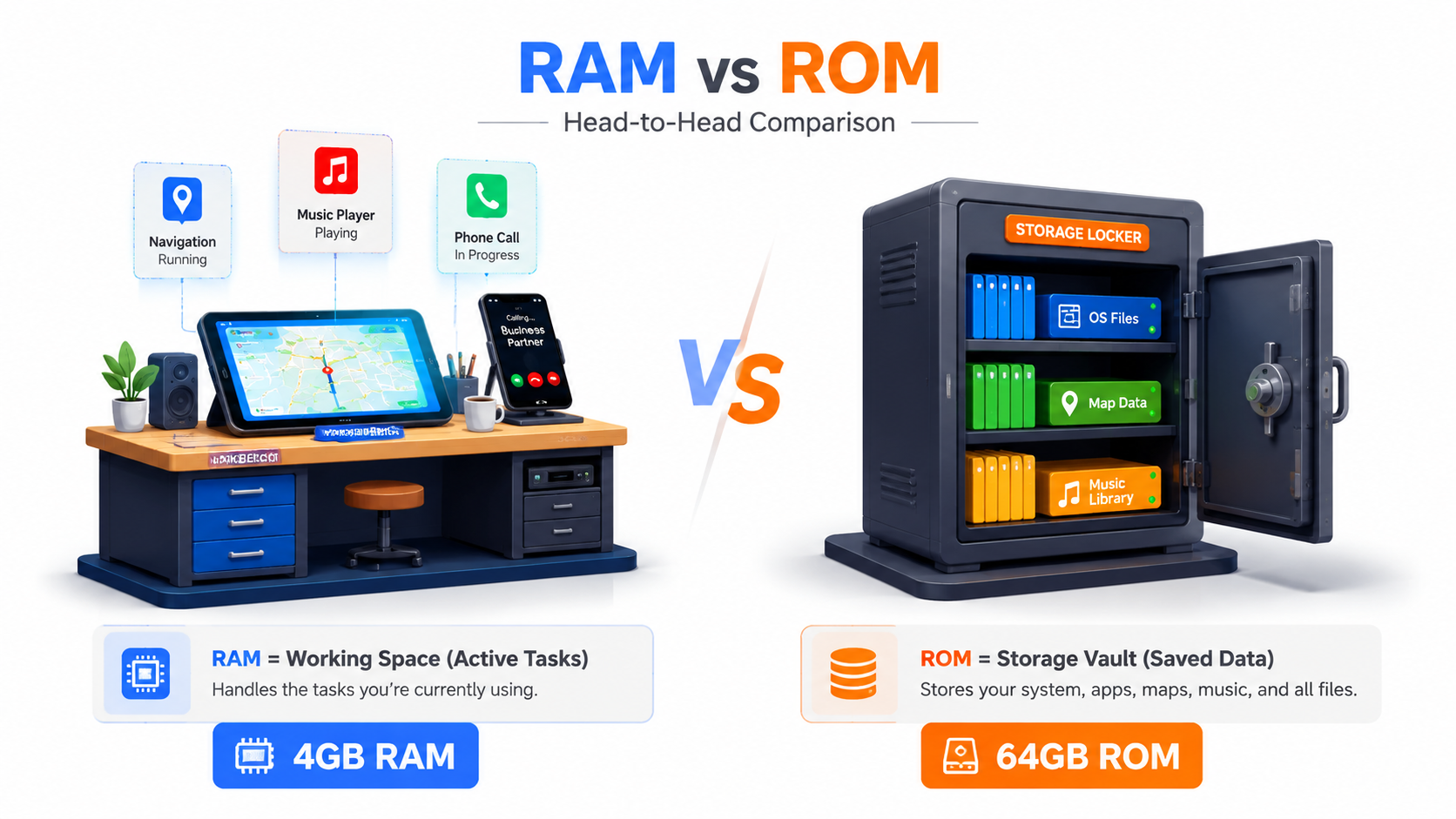
RAM (Random Access Memory) is working memory. It handles running apps, multitasking, and system operations, and clears every time the unit restarts. RAM size directly affects speed and responsiveness.
ROM (Read-Only Memory) is storage memory. It holds the operating system, pre-installed apps, offline maps, music, and user data, and retains everything even when the unit is powered off. Storage capacity is critical for offline maps. See our offline navigation guide for detailed guidance.
A simple way to think about it: RAM is like the size of a workbench — it determines how many tasks you can handle at once. ROM is like a storage cabinet — it determines how many files and apps you can keep on hand.
Both are fixed hardware. Neither can be upgraded by the end user after purchase. That means the configuration chosen at sourcing determines the product’s lifespan and how satisfied your customers end up being. When you see a spec like “4GB+64GB,” that’s 4GB of RAM paired with 64GB of ROM — two separate numbers, two separate jobs.
How RAM and ROM Affect Android Car Stereo Actual Performance
More RAM means more apps can run at once without lag. Insufficient RAM shows up as app reloading, stuttering, and system slowdowns. This happens especially when navigation, music, and phone projection all run at once — normal daily use for most drivers.
ROM works differently. A larger ROM stores more offline maps, apps, and media files. Run out of ROM, and users are forced to delete maps or apps just to keep using the unit, which quietly erodes its usability over time.
The two need to stay balanced:
- High RAM with low ROM is fast, but can’t store much — users hit storage warnings quickly.
- High ROM with low RAM stores plenty, but struggles to run apps smoothly.
- “Lagging” and “insufficient storage” complaints are consistently the top drivers of negative reviews and returns across the wholesale market.
There’s a second layer beyond raw capacity: memory speed. eMMC and UFS storage types read and write at different speeds, and faster memory chips improve responsiveness even at identical capacity numbers.
Common Configurations Explained: Is a 4GB RAM Car Stereo Enough?
| Configuration | Performance | Typical Use Case |
|---|---|---|
| 1GB + 16GB | Basic navigation only; can’t run multiple apps; prone to lag | Price-sensitive emerging markets, limited demand |
| 2GB + 32GB | Entry-level; handles navigation plus one media app | Budget fleets, basic audio upgrades |
| 4GB + 64GB | Mid-range sweet spot; runs navigation, music, and phone projection together without lag | Most B2B aftermarket use cases — the most popular wholesale configuration |
| 6GB + 128GB | Premium; heavy multitasking, multiple apps, extensive offline map coverage | High-end 4S dealership upgrades, demanding markets |
For most buyers wondering whether 4GB is enough: yes, for the large majority of cases. A 4GB+64GB unit comfortably runs navigation, music, and phone projection at the same time, covering roughly 90% of B2B aftermarket scenarios. It’s a reasonable minimum to recommend for 4S dealership upgrades or most cross-border wholesale orders.
Lower-RAM units tend to age faster as apps and maps get updated over time. 4GB offers a decent runway — call it 3 to 5 years of reasonable performance. That matters more than it might seem when you’re sourcing thousands of units at once and can’t easily swap them out later.
For a broader comparison of how Android head units stack up against factory stereos across performance, integration, and feature sets, read our guide: Android Head Unit vs Factory Car Stereo.
How to Match RAM/ROM Specs to Your B2B Business Scenarios
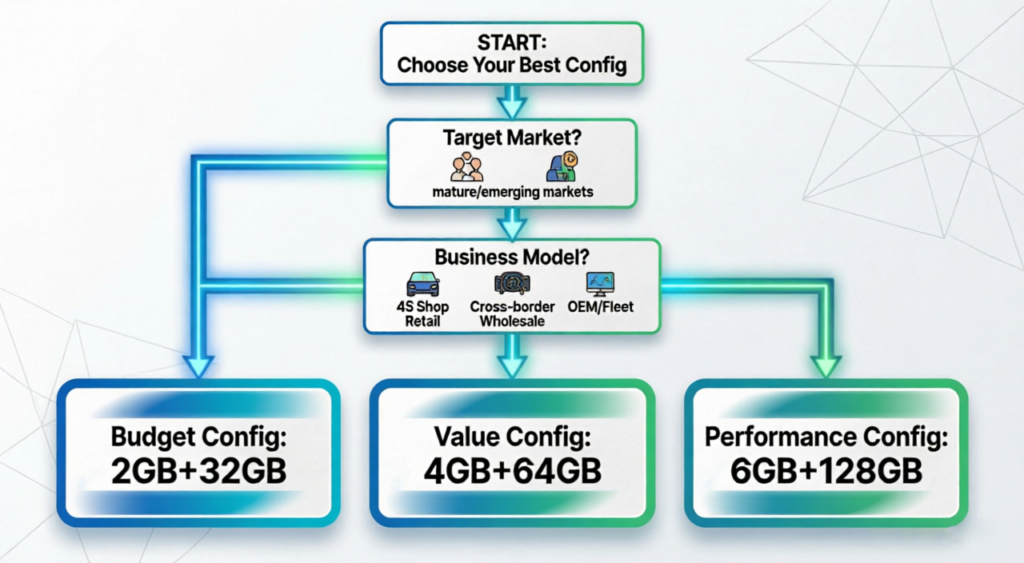
The right configuration depends on your target market and buyer type, not a single “best” spec across the board.
- Emerging market cross-border wholesale (Southeast Asia, Middle East, parts of South America): 2GB+32GB or 4GB+64GB are the most balanced options. 2GB units are becoming harder to sell as buyers increasingly expect modern app performance.
- Mature market wholesale (Europe, North America): 4GB+64GB is the standard minimum, with 6GB+128GB for premium segments where end users expect high-performance head units.
- 4S dealership retail upgrades: 4GB+64GB minimum, moving to 6GB+128GB where the head unit is a key sales differentiator — higher specs here can justify higher retail pricing.
- Fleet and commercial operators: 2GB+32GB may suffice for basic tracking and audio; 4GB+64GB if drivers need navigation, media, and hands-free calling running together.
- OEM/ODM automaker projects: Specs scale with vehicle segment — luxury and premium vehicles typically call for 6GB+128GB, while mass-market vehicles run comfortably on 4GB+64GB. Rungrace supports RAM/ROM hardware customization to match these different market and vehicle requirements.
For a complete framework on matching head unit specs to your business scenario — including 4S dealerships, cross-border wholesale, fleet operators, and OEM projects — read our guide: How to Choose an Android Head Unit for Your Vehicle.
How to Spot Fake Labeled RAM/ROM in Bulk Android Head Units
Memory fraud is a real and persistent problem in wholesale Android head unit sourcing, and it’s one of the more expensive mistakes to catch after the fact — batch-wide lag, crashes, and returns tend to follow.
Two methods show up most often. Software-patched memory reports 4GB in system settings while the actual hardware is 2GB. Cloned storage reporting shows a larger ROM capacity than what’s physically installed.
A few practical ways to verify before committing to bulk production:
- Diagnostic tools — apps like CPU-Z, AIDA64, or DevCheck reveal actual hardware specs independent of what the system reports. Ask suppliers to demonstrate this during sample testing.
- Performance testing — run several apps simultaneously. A unit with fake RAM will slow down noticeably or crash under load; genuine 4GB units handle it smoothly.
- Storage capacity check — load data up to the claimed capacity. Fake ROM units will throw errors or fail before reaching the full amount.
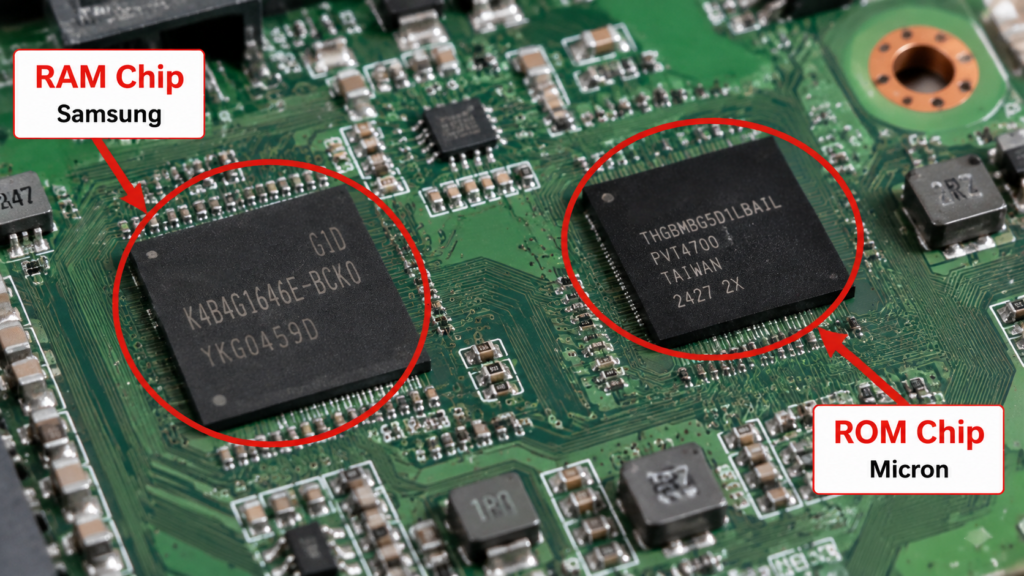
- Hardware inspection — open the unit and check the memory chips directly. Reputable suppliers use branded chips (Samsung, Hynix, Micron); generic or unmarked chips are a warning sign.
Always order samples and test specs before bulk production, and ask suppliers for factory configuration reports and chip sourcing documentation.
Factory QC Standards for Reliable RAM/ROM Performance
Verified specs are only half the story — long-term reliability comes down to what happens on the production line.
Incoming material inspection (IQC) tests memory chips for electrical performance, capacity accuracy, and authenticity before they ever enter production, rejecting anything that doesn’t check out. In-process inspection (IPQC) checks RAM/ROM soldering and connections during assembly to confirm proper physical integration with the mainboard. Function testing (FQC) verifies every unit boots correctly, reads storage properly, runs apps, and holds up under standard memory performance checks.
Two tests catch what a quick function check misses. The aging test runs finished units continuously for 48 hours, exposing hidden defects like data corruption or freezing under sustained use. High-temperature testing around 60°C confirms memory chips hold stable read/write performance under real automotive heat. Units that clear this full chain show meaningfully lower field failure rates than units that only pass a basic function test at the end of the line.
For a complete framework on evaluating the manufacturer behind the product — including R&D capability, QC process, production capacity, and red flags — read our guide: How to Choose a Car Navigation System Supplier.
FAQ
Is 4GB RAM enough for an Android car stereo running navigation and music at the same time?
Yes, for the large majority of use cases. A 4GB+64GB configuration handles navigation, music, and phone projection running concurrently without noticeable lag, which is why it’s the most common configuration in wholesale sourcing. Only heavier multitasking scenarios — multiple apps plus extensive offline map libraries — typically call for stepping up to 6GB.
How can I test if an Android head unit’s RAM and ROM are real instead of fake labeled?
Use diagnostic apps like CPU-Z or AIDA64 to check actual hardware specs, then run a performance test by opening several apps at once — fake RAM units slow down or crash under that load. You can also load data up to the claimed ROM capacity; fake storage will error out before reaching it. Always verify on samples before bulk production, not after.
What is the minimum RAM/ROM spec for Android car stereos sold via cross-border e-commerce?
2GB+32GB is generally the practical floor, though 4GB+64GB is increasingly the safer standard as buyer expectations rise even in price-sensitive markets. Mature markets like Europe and North America tend to expect 4GB+64GB as a baseline, while some emerging markets still accept 2GB+32GB configurations for now.
Do higher RAM/ROM specs always mean better Android car stereo quality?
Not automatically. Genuine, verified specs matter more than the number on the box — a fake-labeled 8GB unit performs worse than a real 4GB unit every time. Memory chip quality and speed (eMMC versus UFS) also affect real-world performance at the same stated capacity, so balanced, verified specs beat chasing the highest advertised number.
How much ROM is needed to store offline maps for multiple countries?
It depends on map detail and country count, but 64GB comfortably handles offline maps for several countries alongside apps and media, which is why it pairs so consistently with 4GB RAM in mid-range units. Buyers targeting extensive multi-country coverage — pan-European or pan-Southeast Asian markets, for instance — should look at 128GB instead.
Conclusion
RAM and ROM solve different problems, and getting the configuration right — and genuinely verified — protects both your margins and your after-sales reputation. For most B2B buyers, 4GB+64GB is the practical sweet spot, but the right call still depends on your target market, and none of it matters if the specs on the box aren’t real.
Sourcing Android head units with verified RAM/ROM specs? Contact our team to discuss configuration options for your target market, or explore our current Android head unit product lineup.


